
The short answer
SOLIDWORKS PDM is Dassault Systèmes' on-premise data management product for SOLIDWORKS teams, sold as PDM Standard and PDM Professional. It suits you when SOLIDWORKS is the centre of your work and you have IT capacity to run its servers. neo is a cloud PDM alternative for hardware teams that want revisions, approvals and supplier sharing without hosting anything, and that can accept file-level CAD sync instead of a SOLIDWORKS add-in.
SOLIDWORKS PDM alternatives by situation
There is no single best alternative; it depends on where your team wants to end up. A rough map:
| Your situation | Options to look at | Hosting |
|---|---|---|
| SOLIDWORKS is your whole world and you have IT to run servers | Stay on SOLIDWORKS PDM Standard or Professional | On-premise |
| You want to stay with Dassault but move to the cloud | The 3DEXPERIENCE platform | Cloud SaaS |
| Your team works mainly in Autodesk Inventor | Autodesk Vault | On-premise (self-hosted server) |
| You are willing to change CAD tools | A cloud-native CAD system with built-in data management, such as Onshape | Cloud SaaS |
| You are willing to move to Autodesk Fusion | Fusion, which stores designs and their version history in Autodesk's cloud, with Fusion Manage added for PLM processes such as change, BOM and release management | Cloud SaaS |
| You want cloud PDM for several mechanical CAD tools, including SOLIDWORKS, Creo, NX and Inventor | Bild, a cloud PDM and PLM with check-out and check-in, BOMs and change orders | Cloud SaaS |
| You need enterprise PLM: BOMs across sites, ERP integration, many workflows | Enterprise PLM systems such as Siemens Teamcenter or PTC Windchill | On-premise, or vendor-hosted SaaS editions |
| You want controlled revisions, approvals and supplier sharing for any CAD, hosted in the EU, without running servers | neo | Cloud SaaS, hosted in the EU |
The hosting column follows what each vendor describes on its own site in October 2026. Prices are left out because not every vendor publishes a list price.
The rest of this page compares SOLIDWORKS PDM with neo in detail, including the cases where SOLIDWORKS PDM is the better tool.
When SOLIDWORKS PDM is the right choice
For some teams SOLIDWORKS PDM is the better tool. Its strengths:
- Deep SOLIDWORKS integration. CAD Editor users work with the vault from inside SOLIDWORKS through an add-in, so check-out, check-in and file states are part of the modelling workflow.
- Reference-aware check-in. When you check in an assembly, the check-in dialog lists the files it references: parts, subassemblies, drawings and SOLIDWORKS Simulation files. You can check in the parent alone or the parent with all its references.
- One vendor for CAD and PDM. The CAD tool and the data management tool come from the same company and follow the same release cycle.
- A mature feature set in Professional. PDM Professional adds parallel approvals, multiple workflows, email notifications, an API, task automation, a browser-based Web2 client and multi-site replication.
If your team designs large SOLIDWORKS assemblies every day and you already run Windows servers, these advantages count.
Where teams struggle
Most of the difficulty lies in running the system.
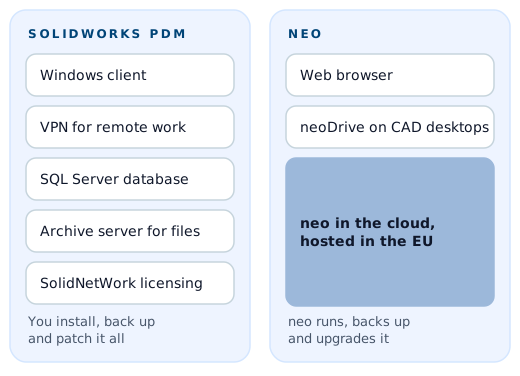
- Servers to own. Both editions use a Microsoft SQL Server database, an archive server for the files, a database server service and the SolidNetWork License Manager. PDM Standard runs on SQL Server Express; PDM Professional uses full SQL Server. Server components run on Windows Server and the native client on Windows. Someone on your side has to install, back up, patch and upgrade all of it.
- Administration. An administrator configures workflows, permissions, data cards and revision schemes. In a small team that role often falls on one engineer, and changes wait until they have time.
- Remote work. The native client talks to your servers over the network, which for remote staff usually means a VPN. PDM Professional offers the Web2 browser client, which Dassault describes as letting remote users search vaults and perform basic functions, and replicated archive servers for additional sites. Each option adds infrastructure.
- Supplier access. To give a contract manufacturer the right drawings, you either provide a licence and a route into your environment, or export the files and send them, which takes the shared copy outside revision control.
- Edition limits. PDM Standard is designed for smaller single-site teams, with one workflow, up to ten workflow states and no parallel approvals. Teams that outgrow it face a move to Professional and full SQL Server.
- Quality documents beside CAD. Change requests, risk files, test reports and supplier records often end up in a separate quality system or a shared drive, because the team set up the PDM vault around CAD.
SOLIDWORKS PDM Professional compared with neo
The table compares what each product offers today, based on Dassault's published documentation for SOLIDWORKS PDM and on neo's own product.
| SOLIDWORKS PDM Professional | neo | |
|---|---|---|
| Deployment | On-premise: SQL Server, archive server, database server, license manager | Cloud, hosted in the EU, run by neo |
| Client | Native Windows client; Web2 browser client for remote use | Browser, plus neoDrive desktop sync |
| SOLIDWORKS integration | Add-in inside SOLIDWORKS | No add-in; neoDrive syncs SOLIDWORKS files as files |
| Assembly references | Read and handled at check-in | Not read; parts and structure are managed in neo |
| Other CAD | Add-ins for SOLIDWORKS, DraftSight, AutoCAD and Inventor, plus Microsoft Office | Files from mechanical and electrical CAD systems via neoDrive |
| Change management | Workflows and transitions configured in the vault | Change requests, approval chains and impact analysis built in |
| Approvals | Parallel approvals | Parallel approvals across engineering, quality and suppliers |
| External access | Licensed users, Web2 or replicated sites | Supplier and customer portals with granular permissions |
| Compliance records | Audit history in the vault | Audit logs and electronic signatures designed to meet 21 CFR Part 11 requirements |
| Administration | Your IT team or reseller | Configured with neo's success team; no servers to run |
What "files, not an add-in" means in practice
neo does not plug into SOLIDWORKS. neoDrive syncs local files into neo, so SOLIDWORKS parts, assemblies and drawings arrive as files with versions, metadata and revisions. Understand the consequences before you choose:
- No check-out from inside SOLIDWORKS. Engineers save in SOLIDWORKS as usual, and neoDrive syncs the result. Version control happens in neo, outside the CAD window.
- Assembly references are not read. neo does not open an assembly to find the parts it uses. If you need a where-used view, you model the product structure in neo with parts and BOMs, and link the CAD files to them.
- Keep file names stable. SOLIDWORKS stores references by file name and path. Rename or move files inside SOLIDWORKS, not in a file browser, so assemblies still find their parts after syncing.
- Agree how you edit shared assemblies. Without a CAD-level lock, your team should decide who owns which assembly, especially when several people work on the same top level.
If most of your effort goes into approvals, releases, quality records and supplier communication, this trade-off is often acceptable. If your engineers spend the day inside large assemblies, it may not be.
Migrating from SOLIDWORKS PDM to neo
You can migrate in stages.
- Decide what moves. Most teams bring over the latest released revision of each file and keep the old vault read-only for deep history. Others move full history for selected products.
- Set up nomenclature. neo's success team helps you define part numbers, document IDs and revision schemes, ideally matching what you use today.
- Migrate the data. The team migrates files, metadata and records from your legacy PDM, spreadsheets and quality system. Historical data is typically inside neo within days.
- Connect engineers. Install neoDrive on CAD workstations so working files sync into neo.
- Run a pilot. Use the free three-month pilot on one product line before moving the rest. Most teams are productive within a few weeks.
You can export all of your data from neo at any time, so you can reverse the decision.
Who should stay on SOLIDWORKS PDM
You are probably better served by SOLIDWORKS PDM if:
- Your team is mostly SOLIDWORKS users working in large, deeply nested assemblies every day.
- You depend on reference-aware check-in, Copy Tree or other operations that understand assembly structure.
- You have built automations on the PDM API, task scheduling or vault workflows.
- You have an IT team that already runs Windows Server and SQL Server comfortably.
- Your CAD reseller provides administration you are happy with.
If you are on SOLIDWORKS and want a cloud option from the same vendor, Dassault also offers Cloud Services for SOLIDWORKS on its 3DEXPERIENCE platform, which it describes as its SaaS PDM.
Who neo suits better
neo fits teams whose hard part is control and evidence rather than CAD file handling:
- Regulated hardware teams that need change requests, approvals and release dossiers that hold up in an audit.
- Teams that work remotely or across sites and want to skip the VPN.
- Companies that share drawings with contract manufacturers and need suppliers to see exactly what they should.
- Teams with mixed mechanical and electrical CAD and a lot of non-CAD documentation.
Read more about cloud PDM and engineering change management, or talk to us about your current vault.