
neo features at a glance
neo is a cloud PDM system for hardware teams. Its features cover the path from a file on an engineer's desktop to a signed, released revision that suppliers and auditors can rely on: document and CAD file management, revisions, projects and permissions, change management, electronic signatures, release dossiers, audit trails, external portals and data export.
| Area | What it does | Why it matters |
|---|---|---|
| Documents and CAD files | Stores CAD files and documents in one workspace; neoDrive syncs desktop files | One place to find the current file |
| Versions, revisions and check-in | Keeps every version and marks formal revisions | You can tell work in progress from released |
| Projects and permissions | Bundles documents, parts and approvals; permissions inherit | Access follows the project |
| Change management | Change requests routed through configured approval chains | Every change has a reason, an owner and an impact |
| Approvals and e-signatures | Validated electronic signatures, parallel approvals | Sign-off that holds up in an inspection |
| Release dossiers | Assembled automatically on approval, exported to PDF | No manual document collection before an audit |
| Traceability and audit trail | Complete logs; every artifact linked to its change | Evidence of who did what, and when |
| Supplier and customer portals | Granular external access | Partners see only what they need |
| Dashboards and notifications | Role-based alerts in the app and by email | You see the work waiting for you |
| Security and hosting | EU hosting, field-level encryption, role-based access | Product data stays protected |
| Data export | Export all data at any time | No lock-in |
Document and CAD file management
neo keeps CAD files, drawings, specifications, test reports and quality records in one controlled workspace. Each file carries metadata such as its document ID, status and project, so you can find it without knowing the folder or file name. Document IDs and part numbers follow the nomenclature you configure.
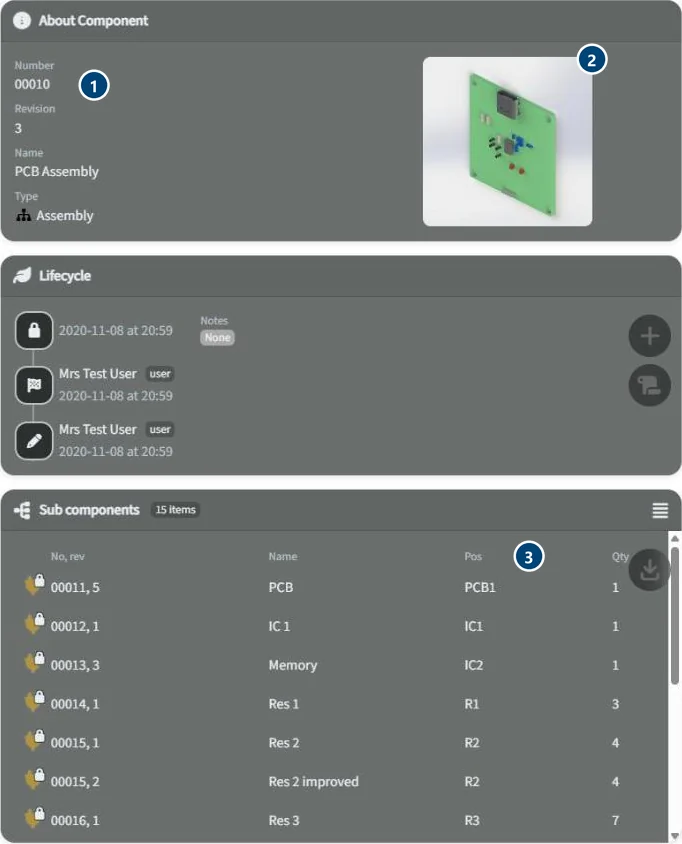 An item in neo. 1: part number and revision from your nomenclature. 2: preview from the CAD file. 3: sub-components with position and quantity.
neoDrive is the desktop client. It syncs local files into neo, including files from mechanical and electrical CAD systems, and works across multiple platforms. Engineers keep working in their own CAD tools while neo keeps the files under control. neoDrive syncs CAD files; it does not replace your CAD system's own file handling.
Why it matters: PDM rollouts most often fail because files drift back to shared drives. When the desktop and the controlled workspace stay in sync, your engineers lose most of their reasons to work outside it.
Versions, revisions and check-in
neo keeps every saved state of a file as a version, and formal revisions mark what your team has approved and released. You add files to neo through check-in, which records who added what and when. Read seats have no create or check-in rights, so only the people you have given that role can change controlled files.
Why it matters: production, quality and suppliers need the released revision, whatever someone saved last. See what is PDM for more on versions and revisions.
Projects and permissions
A project bundles the documents, parts and approvals that belong together, for example a product, a variant or a development program. Permissions inherit from the project, so when you add someone to a project they get the right access to everything in it.
Roles are granular: view, edit, approve and release. Each workspace or project has Read/Write, Read-only and administrator roles.
Why it matters: you keep project-level access correct more easily than file-by-file access, and you explain it to an auditor more easily too.
Change management
Change requests are first-class objects in neo instead of email threads. You can propose a change from any item, attach the impacted documents and route the request through the approval chain configured for that kind of change. Impact analysis shows what blocks the change before anyone approves it.
Why it matters: most of the risk in hardware sits in changes after the first release. A structured change record captures why something changed, who approved it and what it affected. Read more in engineering change management.
Approvals and electronic signatures
Approvals run through configured chains, with parallel approvals across engineering, quality and suppliers where that fits your process. neo notifies reviewers in the app and by email.
Approvers sign with validated electronic signatures. These signatures and audit trails are designed to meet 21 CFR Part 11 requirements, and the approval model supports FDA, ISO 13485 and ISO 9001 style document control. Configurable templates check that a document set is complete before it moves forward.
Why it matters: quality teams need sign-off that is attributable, recorded and tied to the exact revision someone approved.
Release dossiers
When a release is approved, neo assembles the release dossier automatically: metadata, signatures and the artifacts that make up the release. You can export the dossier to PDF and share it with auditors.
Why it matters: neo produces the release package as part of the approval, so you do not collect documents by hand before an audit. Regulated teams can also store, version, approve and link CRA technical documentation and SBOMs to product revisions here; see the Cyber Resilience Act guide.
Traceability and audit trail
neo keeps complete audit logs of actions in the workspace. Metadata links every artifact to the change it originated from, so you can follow a released file back to the request, the approvals and the signatures behind it.
Why it matters: when an auditor or customer asks why a part looks the way it does, you already have the answer on record. See engineering document control for the underlying practice.
Supplier and customer portals
You can give contract manufacturers, suppliers and customers access through portals with granular permissions. They see only the documents and revisions you share with them, and suppliers can take part in approvals where your process requires it.
Why it matters: a controlled portal replaces emailed zip files and broad folder access, and neo records every external action in the same audit trail.
Dashboards and notifications
Dashboards and role-based alerts show each person the work that concerns them in the app, and neo emails reviewers when an approval is waiting.
Why it matters: approvals stall when nobody notices them. With pending work visible, your team keeps changes moving without status meetings.
Security and hosting
- Hosted in the EU.
- Field-level encryption.
- Granular role-based permissions per workspace and project.
- Complete audit logs.
neo can connect to ERP and quality systems; talk to us about your setup. Read more about cloud PDM.
Data export
You can export all data at any time. Release dossiers export to PDF, and you can take the full data set out if you need it elsewhere.
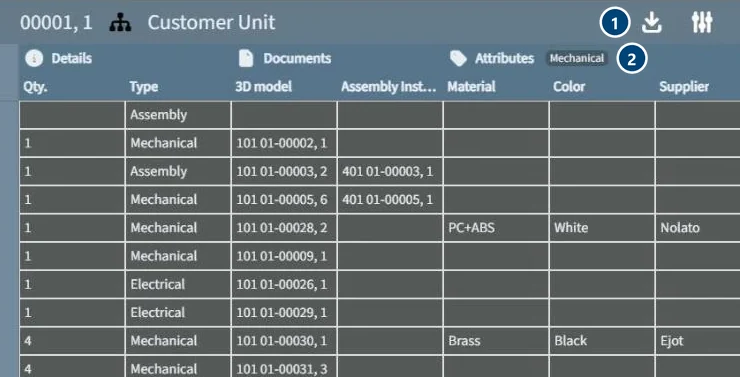 The product structure as a table. 1: export the structure. 2: choose which attributes to show, such as material, colour and supplier.
Why it matters: your product data outlives any single tool, and knowing you can leave makes it easier to commit.
Try the features on your own data
Judge the features against your own files and approval flow. neo offers a free three-month pilot; see pricing for seat prices. Take the product tour or talk to us.