
PDM sized for 3 to 30 people
PDM for small teams means getting the core of product data management (controlled revisions, check-in, approvals, an audit trail and safe supplier sharing) without the servers, consultants and months of configuration that enterprise rollouts assume. A hardware team of 3 to 30 people needs a PDM it can set up itself, adopt in weeks and afford per seat.
The situation small hardware teams are in
Small engineering teams start with a shared drive, a naming convention and good intentions. That works while three people sit in the same room and remember which file is current. It stops working at predictable moments:
- The shared drive breaks down. Files named
bracket_v4_final_REAL.stepappear. Two people edit the same assembly. Nobody is sure which drawing went to the supplier. - There is no PDM administrator. The person who set up the folders is also the lead mechanical engineer, and the team has no IT department to run a server.
- The company moves from startup to scale-up. New hires join, a second product line starts, and knowledge that lived in a few heads now has to live in a system.
- The first audit arrives. An ISO 13485 certification, an ISO 9001 audit or a large customer's supplier audit asks for evidence that you review, approve and control your documents.
- The first contract manufacturer comes on board. Drawings, specifications and BOMs now leave the building, and you need to know which revision they built from.
More folder discipline helps for a while, but a shared drive does not know what a revision is, who may release it or what a change affects. For the background, start with what PDM is.
Why enterprise PDM rollouts are a poor fit
Vendors designed traditional PDM systems for organisations with an IT team and a dedicated PDM owner. A small team pays costs that the licence price does not show:
- Servers. On-premise PDM needs a database server, a file vault, backups and upgrades. Someone has to own them, and remote access often goes through a VPN.
- Consultants. A reseller or consultant commonly delivers configuration, workflows and data migration, billed separately.
- Months of rollout. In enterprise PDM, a project often starts with a requirements workshop and goes live a quarter later. A small team cannot pause engineering for that long.
- Administration that never ends. User management, permissions, upgrades and troubleshooting land on an engineer who would rather be designing.
A 500-person company can absorb this. A team of ten often postpones PDM until an audit forces it, which is the worst time to start.
What "enough PDM" looks like
A small team needs the parts of PDM that prevent real mistakes and produce audit evidence as a side effect of normal work:
- One controlled place for CAD files and documents, with check-in so nobody overwrites work.
- Revisions that mean something: released, approved and traceable, separate from working versions.
- A simple change process: a change request, the documents it affects, and named approvers.
- Release packages that collect the approved documents and signatures for production or an auditor.
- Role-based access, so a contract manufacturer sees the released drawings for their part and nothing else.
- An audit trail that answers who changed what, when and why, without anyone writing it down.
- A way out. You should be able to export all of your data at any time.
A system that covers these puts your team in control. The rest can wait until you have a concrete need.
A practical adoption plan
A small team can adopt PDM in a few weeks without stopping engineering work. Adjust the pace of this plan to your team.
Week 1: decide the rules. Agree on part numbering and document IDs, the revision scheme (for example A, B, C for released revisions) and who approves what. Keep it short; you can refine later. In neo, nomenclature is configurable, and our success team helps you define it.
Week 2: move the active data. Start with one current project rather than the whole archive. Bring in the CAD files and documents people work on today, set up the project and its permissions, and install neoDrive on the engineers' machines so local files sync into neo.
Week 3: run one real change. Pick one, such as a drawing update for a supplier. Create the change request, attach the affected documents, route it to the approvers and release it. Your team learns more from one complete loop than from a training session.
Week 4: open the door to externals and history. Give your contract manufacturer or key supplier access to the released documents they need. Bring in historical data from spreadsheets, old folders or a previous system; our team handles the migration, and historical data is typically inside neo within days.
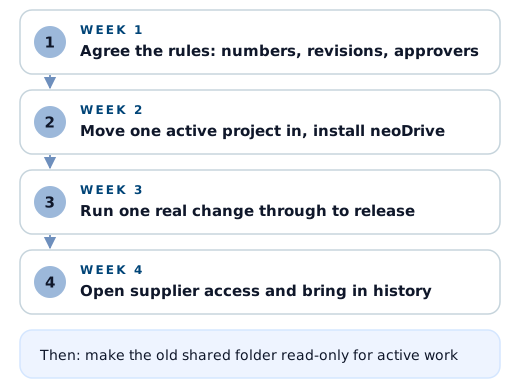
After that, retire the old shared drive for active work. A drive left writable is the most common reason adoption stalls.
What it costs: a worked example
neo is priced per user per month, with two seat types plus a desktop sync add-on:
| Item | Price per user per month |
|---|---|
| Read/Write seat (create, check in and edit) | 500 SEK |
| Read seat (view, no create or check-in rights) | 200 SEK |
| neoDrive (desktop file sync) | 150 SEK |
Quality, production and management usually only view released data, which a Read seat covers. Write access is for the people who create and check in files.
A hypothetical example: a 9-person hardware team with 5 engineers who create and check in CAD files, and 4 colleagues in quality, production and management who mainly look up released data.
| Line | Seats | Monthly cost |
|---|---|---|
| Read/Write | 5 × 500 SEK | 2,500 SEK |
| Read | 4 × 200 SEK | 800 SEK |
| neoDrive for the engineers | 5 × 150 SEK | 750 SEK |
| Total | 4,050 SEK per month |
Compare that with the full cost of an on-premise system: licences, a server, backups, consultant days for setup and migration, and the engineering hours spent administering it. Above 10 users, volume pricing applies; see pricing or talk to us for a quote.
Start with a free 3-month pilot
Evaluate PDM with your own files and a real change. neo offers a free 3-month pilot, long enough to run the adoption plan above, release real documents and see whether your team keeps using it once the novelty is gone.
During the pilot you work with the people who built neo. Support replies within one business day, usually the same day, and you skip the ticket queue.
Teams using neo
- Sensative, which makes IoT sensors and gateways, manages a catalog of more than 50,000 parts in neo and shortened audit preparation from weeks to days. Read the Sensative story.
- Triomed, which develops a peritoneal dialysis medical device, runs a closed-loop quality process in neo across four sites and stays audit-ready. Read the Triomed story.
- Spiideo, which builds AI sports production systems, configures customer-specific product variants in neo. Read the Spiideo story.
More examples are on our customers page.
Where to go from here
If you recognise your team in the situation above, pick one project and one real change, and try it. Take the product tour, see what neo PDM software includes, read how neo compares as a cloud PDM, or talk to us about a pilot.