
Integrations in neo, plainly stated
neo connects to the tools around it in four ways: neoDrive syncs files from mechanical and electrical CAD systems into neo, you can export all data at any time, email notifications keep reviewers informed, and supplier portals replace email attachments. We set up connections to ERP and quality systems per customer, so start with a conversation about your setup.
What this page covers
Integration pages in this category often list dozens of logos. This one lists none, because we would rather you know what neo does today than discover the gaps during a pilot. You will find:
- How neoDrive works, and what it does not do
- How export works and why it matters
- How notifications and supplier portals cover most day-to-day "integration" needs
- How to think about ERP and quality system connections
- How to work out which integration you need
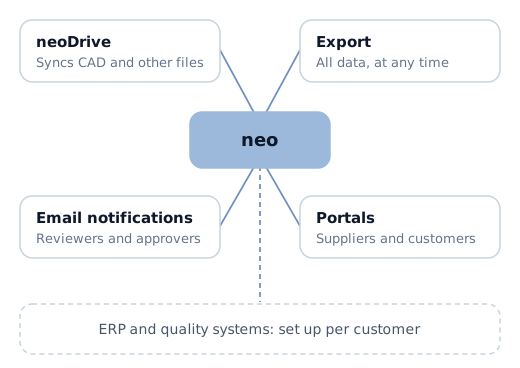
neoDrive: file sync for CAD and engineering files
neoDrive is a desktop application that syncs local files into neo. It handles files from mechanical and electrical CAD systems as well as ordinary documents, and it runs on multiple platforms.
The flow looks like this:
- neoDrive keeps a local folder on the engineer's machine in sync with neo.
- Engineers open and save files in their usual CAD tools, working on the local copies.
- When a file is ready, the engineer checks it in to neo, and each check-in becomes a version with its metadata and history.
- Colleagues and reviewers see the checked-in state in neo, where your team handles changes and releases.
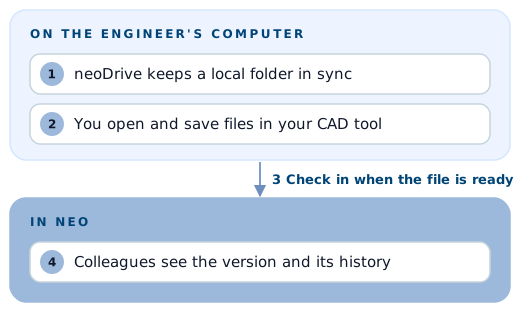
Your engineers keep working in their CAD tools as before. The controlled record lives in neo, and neoDrive connects the local files to that record.
What neoDrive does not do
- It is file sync, not a CAD add-in. neoDrive does not install a panel or menu inside your CAD software. You work in the CAD tool as usual and the files sync.
- It does not read assembly structures or references. neoDrive does not open your CAD files to extract an assembly tree or part references automatically. You define the product structure in neo.
- It is not a CAD-specific vault. If your process depends on deep CAD-specific behaviour inside the modelling tool, test that against your real workflow in a pilot before deciding.
Many hardware teams welcome this trade-off: one tool handles files from several CAD systems the same way, and revisions, approvals and release happen in one place whichever tool produced the file. If your team relies heavily on in-CAD data management, you should know this up front. Our SOLIDWORKS PDM alternative page covers that comparison in more detail.
Export all data, at any time
You can export all data from neo at any time. That gives you:
- Ownership. Your product data is yours, and neo does not lock you in.
- Audits and archives. You can export release dossiers to PDF and share them with auditors, and send full exports to long-term archives.
- Downstream systems. An export is often the simplest way to hand released data to another system, such as a purchasing or production process, without building a live connection.
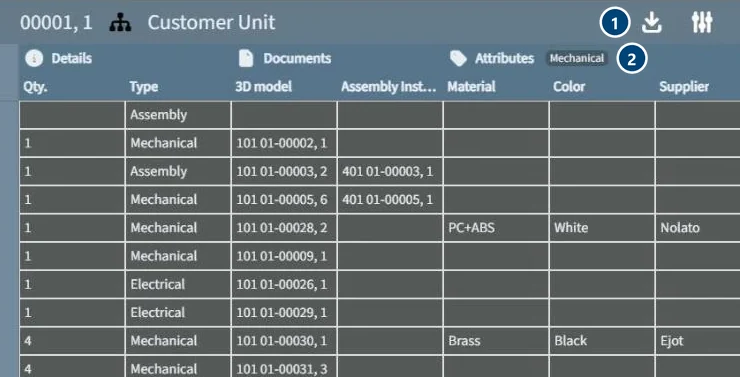 Export from neo. 1: export the product structure. 2: the attributes you choose come with it.
Notifications by email
neo notifies reviewers and approvers in the app and by email when something needs their attention, and role-based alerts and dashboards show who is waiting on what. For many teams this is the integration that matters most: the people who need to act hear about it in the inbox they already watch, and nobody forwards messages by hand.
Supplier portals instead of email attachments
The most common informal "integration" in hardware companies is an email with a drawing attached. It works until the supplier builds from an outdated revision.
neo replaces this with supplier and customer portals with granular permissions. External partners see only what they need, such as the released revisions of the parts they make. The portal shows the released state in neo, so no second copy drifts out of date, and suppliers can take part in approvals where your process includes them.
ERP and quality systems: talk to us about your setup
neo can connect to ERP and quality systems, but each company's setup differs: different systems, different owners of master data, different rules about which system is the source of truth for what. We do not publish a list of connectors, and we will not promise one that does not fit your setup.
We look at your setup with you instead:
- Which system owns part master data, and which owns engineering data
- What needs to move between systems, and how often
- Whether a clean release handoff and export covers the need, or a live connection is justified
If you have a specific system in mind, talk to us and describe it. You will get a straight answer about what is possible.
How to work out which integration you need
Before you judge any PDM system by its integration list, ask what problem the integration should solve. Many teams find they need less than they expected.
| What you want | What often solves it |
|---|---|
| Production and purchasing use the right revision | A clear release step, plus read access or an export of released data |
| Suppliers build from current drawings | Supplier portals showing released revisions |
| Reviewers act without delay | Email notifications and role-based alerts |
| Auditors get complete evidence | Release dossiers exported to PDF, and the audit trail |
| Engineers keep their CAD workflow | File sync through neoDrive |
| Part data in ERP matches engineering | A defined release handoff; a live connection only if volume and frequency justify it |
These questions help you separate real needs from nice-to-haves:
- How often does data move? A handful of releases a month rarely justifies a custom connection.
- Who owns the data? If two systems both claim part numbers, an integration will automate the conflict.
- What breaks today? Start from the errors you see, such as wrong revisions at suppliers or missing approvals, and work back to the smallest fix.
- What will it cost to maintain? Each live connection needs an owner whenever either system changes.
In our experience, a clean release handoff and a reliable export are often enough for small and mid-sized hardware teams. When they are not, you are better off learning that in a conversation than from a datasheet.
Next steps
See how files, changes and releases fit together on how neo works, compare plans on pricing, or talk to us about the systems you use today.