Cloud PDM is product data management delivered as a hosted service: the vendor runs the servers, storage, backups and upgrades, and your team works in the system through a browser and a desktop sync client. It does the same job as traditional PDM (controlled revisions, check-in, approvals, change management and an audit trail) without hardware or a VPN for you to maintain.
What cloud PDM is, and what it is not
A cloud PDM system keeps the controls of PDM and changes only where the system runs and who operates it. General file sync tools store and share files well, but they do not know what a revision is, who may release it or which products a change affects.
In practice:
- Revisions and releases are formal states, separate from working versions.
- Change requests and approvals run through defined workflows with named approvers.
- Permissions decide who can view, edit, approve and release, per project and per role.
- The system logs each action, so you get an audit trail without anyone maintaining it.
If PDM itself is new to you, start with what PDM is.
Cloud PDM compared with on-premise PDM
Traditional PDM runs on servers you host: a database, a file vault and often a separate server for search or replication. Cloud PDM moves that infrastructure to the vendor, and you notice the difference in daily operation more than in feature lists.
| On-premise PDM | Cloud PDM | |
|---|---|---|
| Infrastructure | Your servers, storage, backups and disaster recovery | Run by the vendor |
| Remote access | Usually VPN or remote desktop | Browser and desktop sync client over the internet |
| Supplier access | Separate accounts, VPN access or files sent by email | Role-based access in the same system, limited to what each supplier needs |
| Security model | Network perimeter plus your own server hardening | Vendor-run encryption and access control, with permissions you configure |
| Upgrades | Planned projects, often with a consultant and downtime | Delivered by the vendor |
| Cost | Licences plus hardware, admin time and consultant days | Subscription per user |
| Time to start | Weeks to months | Days to weeks |
Neither column suits every company. You choose which cost to carry: running infrastructure yourself, or trusting a vendor to run it.
Security and data residency questions to ask
Ask any cloud PDM vendor these questions before you move engineering data to a hosted service. neo's answers follow each one.
- Where is the data hosted? Ask for the region as well as the company address. neo is hosted in the EU.
- How is data encrypted? Encryption in transit is standard; ask what the vendor encrypts at rest and how. neo uses field-level encryption.
- How fine-grained are permissions? Look for roles per project, separate view, edit, approve and release rights, and a way to limit external users to specific items. neo has Read/Write, Read-only and administrator roles per workspace and project, with view, edit, approve and release permissions inherited from the project.
- What is logged? Each view, change, approval and release should appear in an audit log you can inspect and export. neo keeps complete audit logs.
- Can you leave? Ask how you get all your data out, in what format and at what cost. neo lets you export all data at any time.
- Which certifications and contractual terms apply? If procurement requires specific certifications, a data processing agreement or particular contract terms, ask for the documents and read them in full. For neo, talk to us about your requirements.
Regulated teams should also ask how the vendor handles electronic signatures and audit trails. neo provides validated electronic signatures and audit trails designed to meet 21 CFR Part 11 requirements, and supports ISO 13485 and ISO 9001 style document control.
How CAD files work with cloud PDM
CAD tools work on local files, and nobody edits a large assembly in a browser. Each cloud PDM therefore needs a way to move files between the engineer's machine and the controlled system.
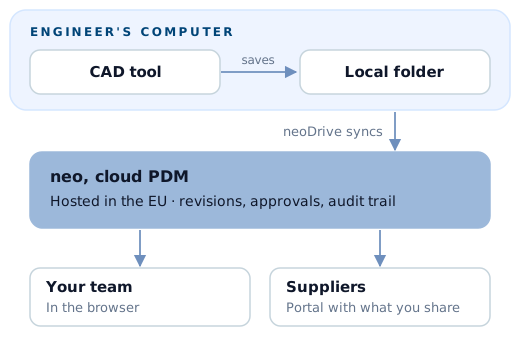
In neo, that is neoDrive, a desktop client that syncs local files into neo. It works with files from mechanical and electrical CAD systems and runs on multiple platforms. Your engineers work in their CAD tool as usual; the files sync into neo, where your team handles check-in, revisions, approvals and releases.
Three limits to know:
- neoDrive syncs files. It is not a plug-in inside your CAD tool.
- You manage revisions, part numbers, metadata and approvals in neo, not inside the CAD application.
- Read seats cannot create or check in files, so write access stays with the people who need it.
If your workflow depends on deep integration inside one CAD tool, test that with your own assemblies during a trial. Hardware teams that use several CAD tools, or mix mechanical and electrical design, often find a file-based sync the simpler arrangement.
When on-premise PDM still makes sense
On-premise can still be the better fit when:
- Contracts or regulations require data in your own facilities, for example certain defence or government programmes.
- Your sites have limited or unreliable internet access, and engineers must work against a local server.
- You already run an on-premise PDM well, with an IT team, stable workflows and no real pain, and the switching cost outweighs the benefit.
- Your work depends on a CAD-specific feature that only the vendor's own server-based PDM provides.
Otherwise, the infrastructure usually costs a small or mid-sized team more than it gives back. PDM for small engineering teams covers that case.
Migrating to cloud PDM
Treat a migration as a data and process project more than a software installation:
- Decide what to migrate. Active projects and released revisions first; the full archive can follow, or stay read-only where it is.
- Fix the numbering before moving data. Part numbers and document IDs are easier to clean up during migration than after.
- Map your revision and approval model. Write down how you name revisions and who approves what, then configure the new system to match.
- Preserve the evidence. For regulated products, keep the approval history and signatures from the old system available, as exported records if needed.
- Run one real change before cutting over. Release a real document through the new workflow while the old system is still available.
- Close the old path. Once active work has moved, make the old system or shared drive read-only.
With neo, our success team helps define nomenclature and migrates existing data from spreadsheets, legacy PDM or PLM systems, CAD files and quality records. Historical data is typically inside neo within days, and most teams are productive within a few weeks. A free 3-month pilot lets you test this with your own data first.
Next step
Read how neo works for the day-to-day workflow, check pricing, or talk to us about moving your current setup.