
Part of our Cyber Resilience Act guide. Reviewed on 17 October 2026.
CRA compliance and product data
The EU Cyber Resilience Act requires manufacturers of products with digital elements to keep technical documentation, including a software bill of materials (SBOM), for at least 10 years or the support period, whichever is longer. neo is a cloud PDM system that keeps that documentation versioned, approved and linked to the product revision it describes, with a complete audit trail. It does not generate SBOMs or scan for vulnerabilities.
The problem: evidence spread across tools
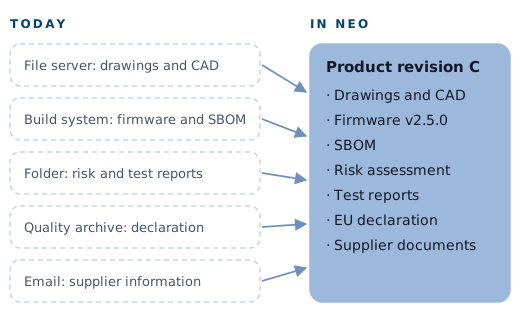
Most hardware teams already produce much of what the CRA asks for, spread across different places:
- Drawings, schematics and CAD files in a file share or a CAD vault.
- Firmware versions and SBOMs in the software team's build system.
- Risk assessments and test reports in someone's documents folder.
- Declarations of conformity in the quality team's archive.
- Supplier information about components in email.
Each piece may be correct on its own. The hard part is showing how they fit together for one product: which firmware version, SBOM, test report and declaration belong to the hardware revision that shipped in a given month.
The regulation expects that documentation to stay complete and current for at least ten years; the Cyber Resilience Act guide lists what it must contain. A folder structure you maintain by hand rarely survives that long intact.
How neo supports CRA documentation
neo handles CRA evidence like any other controlled engineering record.
One controlled place for the technical file. Projects bundle documents, parts and approvals for a product. Your team checks in CAD files, drawings, risk assessments, test reports, SBOM files and declarations of conformity, and neo versions them and keeps them together. neoDrive syncs files from local folders, including files from mechanical and electrical CAD systems, so the controlled copy is the one engineers work with.
Linked to product revisions. Metadata links every artifact to its originating change. When you release a hardware or firmware change, neo ties the documents that describe it to that revision, so you can show what shipped in which revision.
Reviewed and approved. Change requests, approvals and release dossiers are first-class objects in neo. You propose a change from any item, attach impacted documents, and route the change through a configured approval chain. Engineering, quality and suppliers can approve in parallel, and impact analysis shows what blocks a release.
Complete before release. Configurable templates check that a document set is complete. Build a template around the Annex VII contents and you see before release whether the risk assessment, SBOM or test reports are missing.
Release dossiers on approval. When a change is approved, neo assembles the release package with metadata, signatures and artifacts. You can export it to PDF and share it with auditors, notified bodies or market surveillance authorities.
Audit trail and access control. neo logs every action with who, what and when. Granular role-based permissions decide who can view, edit, approve and release. Supplier and customer portals give external parties access to only what they need, which helps when you collect component information for due diligence.
Retention you control. neo is hosted in the EU with field-level encryption, and you can export all data at any time, so your technical documentation stays out of vendor lock-in for the 10 years or more the regulation requires.
CRA documentation needs, mapped to neo
| CRA documentation need | Reference | How you handle it in neo |
|---|---|---|
| General product description, intended purpose, software versions, hardware photographs or illustrations | Annex VII point 1 | Stored as controlled documents in the product's project and linked to the released revision |
| Design and development information, drawings, schemes, system architecture | Annex VII point 2(a) | CAD files and drawings checked in or synced with neoDrive, versioned and released through change requests |
| SBOM and vulnerability handling documentation | Annex I Part II point 1, Annex VII point 2(b) | SBOM files generated by your SBOM tool are checked in, versioned, approved and linked to the matching product revision |
| Cybersecurity risk assessment | Article 13(2) to (4), Annex VII point 3 | Controlled document with review and approval; updates go through change requests |
| Support period rationale | Article 13(8), Annex VII point 4 | Controlled document linked to the product |
| Test reports | Annex VII point 6 | Attached to the change or release they verify |
| EU declaration of conformity | Article 28, Annex VII point 7 | Approved with signatures and included in the release dossier |
| Keep documentation updated | Article 31(2) | Change requests record what changed, why and who approved it |
| Retention for at least 10 years or the support period | Article 13(13) | Full version history and audit trail in neo, with export of all data at any time |
| Third-party component due diligence | Article 13(5) | Supplier documents collected through portals with granular permissions |
What neo does not do
CRA compliance needs more than document control. These are the boundaries:
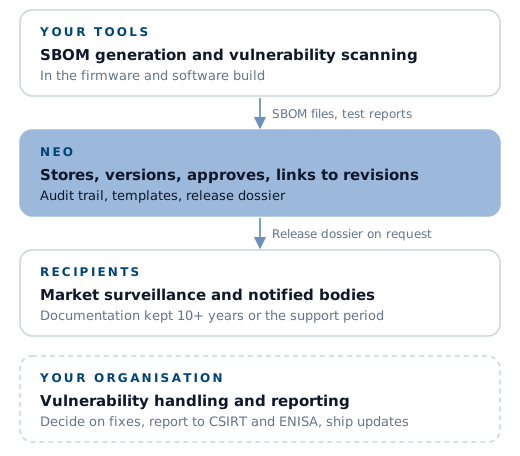
- neo does not generate SBOMs. You need an SBOM tool in your firmware and software build process. neo stores, versions, approves and links the SBOM files that tool produces.
- neo does not scan for vulnerabilities. Monitoring components against vulnerability databases requires dedicated tooling.
- neo does not run your vulnerability handling process. Receiving reports, deciding on fixes, notifying the CSIRT and ENISA under Article 14, and distributing security updates are processes your organisation owns.
- neo does not make a product compliant. Conformity depends on the product meeting the essential requirements in Annex I and on the correct conformity assessment procedure. neo keeps the evidence controlled.
neo provides the controlled record that ties these activities to your product revisions, so the evidence is complete and retrievable when an authority requests it.
Getting started
Most teams start with one product line. The neo success team helps define nomenclature and part numbering and migrates existing data, from spreadsheets and legacy PDM or PLM systems to CAD files and quality records. Most teams are productive within a few weeks, and historical data is typically inside neo within days.
Two resources help you scope the work:
- The CRA engineering checklist lists the practical steps for engineering teams.
- SBOMs and product data explains how SBOMs relate to the product structure and revisions.
neo offers a free 3-month pilot. To see how your CRA documentation would look in neo, take the product tour or talk to us.